Showing posts with label Applications. Show all posts

Sunday, August 4, 2013

Facebook brings Cover Feed to Android app, makes Facebook Home seem even more pointless


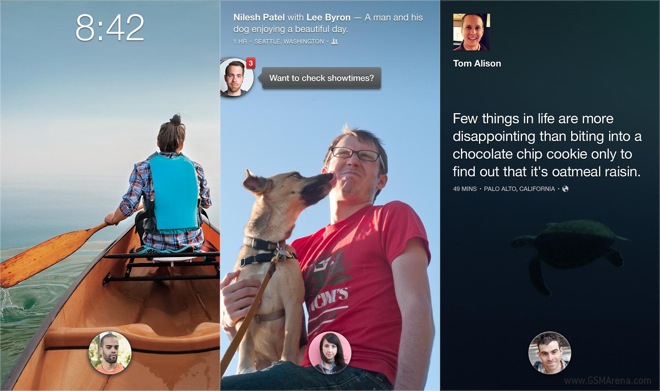
Facebook has released a new update for their Android app, which brings one of the key features of the ill-fated Facebook Home app. Now, through an option in the settings menu, you can enable the Cover Feed feature on your Android device, without having to install Facebook Home app.

If you are not aware, Cover Feed takes over the lockscreen on your Android device with a custom lockscreen that plays a slideshow of your friends’ Facebook photos in the background underneath the unlock button. While it sounds great in theory, actually having all your friends’ photos appear on your lockscreen isn’t such a great idea as most of the time the photos aren’t as good as you’d like them to be (not with my friends, at least).

Cover Feed, along with Chat Heads, was one of the key features of Facebook Home. Now, you can have both without actually installing that app (Chat Heads are available through the Facebook Messenger app). This means now you have even fewer reasons to install Facebook Home, and there weren’t many to begin with.

There is a catch, however. Just like the Facebook Home app, the Cover Feed feature only works on select Android devices as of now. The list currently includes Samsung Galaxy S4, Samsung Galaxy S III, Samsung Galaxy Note II, Nexus 4, HTC One X, HTC One X+ and HTC One. More devices should be added in future.

Download

Read More
No comments:

Monday, July 29, 2013

Google releases Play Games app for Android

Google has released a new dedicated app for all the games on the Play Store, called Google Play Games. This app puts focus on discovering new games as well as tracking your achievements and scores as well as playing multiplayer games with your friends. It’s more or less the Game Center equivalent for Android.


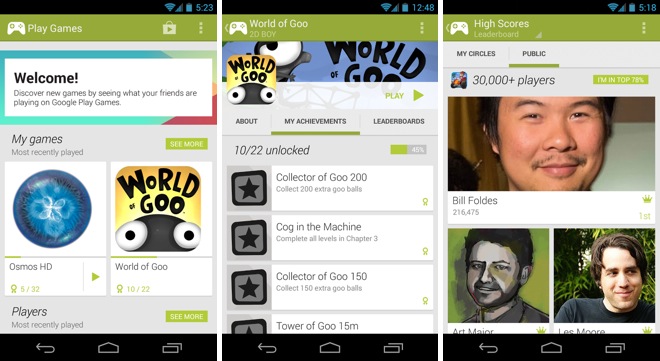
The Play Games app looks quite similar to the new Play Music and Play Movies apps. You can see a list of your friends from Google+ with details about the games they have and their achievements. Currently, not a lot of games support this feature so you’re likely to see mostly empty profile pages.

The app also has a featured games section where it highlights new games. Below, it suggests people that you may know but aren’t already in your Google+ circles.

The app keeps a list of your own games, along with recently played ones and your achievements. Just like the Play Music, Movies or Books app, you can’t actually purchase anything from this app but are directed towards the Play Store app when you hit the purchase button. You do see the list of achievements (including the ones you’ve unlocked) and leaderboards for that game, which is not visible on the Play Store.

The Play Games app is now available on the Play Store and can be downloaded from the link below.

Download


Read More
No comments:

Monday, July 8, 2013

How to unlist an Android device from Google Play?

If you have had a few Android devices with the same Google Account, you must have observed that when you find an app to install, it presents you your previous devices as well, which you may no longer be using any more.

As in the above illustration, I no longer use the ZTE BLADE but it is still shown.

To Remove an unused Android Device on Google Play account, do the following -
  • Log in to Google Play Account
  • Scroll down to the bottom of the page > My Orders & Settings link
  • Click Edit
  • Uncheck "Shown in menus" corresponding to the device you want to hide.
  • Click Update


Now you should not see the old device when you are looking for a new app to install.


Note: The above steps only hides device and does not remove a device's association with Google Account.

Check out a discussion on XDA DEVELOPERS on how to remove device from Google Account.

Before you handover an Android device to someone or selling off, doing a factory reset is a safe thing to do.

Read More
No comments:

How to change the Android Application name?

Ever thought you wanted to change an Android Application name? Sometimes you might want to - to disguise an app for privacy.

In desktop OSes, it's easy to rename a program or even the shortcut of a program. But it is not so in Android. Not yet.

If you want to rename an Android app, you can try out this app


How it works:
Open the App Name Editor. It displays most of the apps installed in your device.
Tap on the one you want to edit
Select "Edit Application"
Assign a new name
This assignes a new name to the app WITHIN "App Name Editor"
Tap on the edited app in "App Name Editor" and click "Add Shortcut to home"
It creates a shortcut to the app in the home screen


What it does not do is -
It does not change or rename the original app installed, that is, change is not out side of "App Name Editor". So if you open the main app drawer, the app is as it is
It only edits it's name within and creates a shortcut to home screen. The original app when you open the app drawer remains as it is.
So the disguise works only in the home screen. Besides if the attempt is to disguise an explicit app with a screaming logo, ignore this app! It's not gonna work ...lol


If you want more than this, like changing the app name and even icons, check this blog post out.

Read More
No comments:

AirDroid2 - Manage your phone without cables using browser


AirDroid is a useful tool to manage your phone without cables using a browser. Yes, using a browser!
 I was using Samsung Kies Air on my Samsung Galaxy Grand. AirDroid is similar tool but much smoother than Samsung Kies.


Connection to access your phone via a browser is simple:
  • Open AirDroid - You get an IP address such as http://192.168.2.2:8888
  • Enter this IP address in a browser
  • Accept connection request
 and you can start browsing your phone files and manage them using the browser.
With AirDroid 2 you can manage External SD card using a browser.

But External SD card is still not accessible from the AirDroid2 app on the mobile > Tools > Files.
It only shows /storage/sdcard0

Read More
No comments: