Showing posts with label Google Play. Show all posts

Tuesday, August 6, 2013

Google launches Play Store v4.3.10 update with minor tweaks


Google has launched an update for the Google Play Store app bringing it to version 4.3.10. The update doesn’t bring major user interface changes, as most of the updates are under the hood.

Android Police has dug around the app’s inner workings and have found exactly what the fixes and improvements are. In the latest version of the Play Store Google introduces the “Recently updated” section. Its idea is simply to provide you an app list of the ones that have received an update most recently.

Next up are the updated app notifications, which are now combined into a single notification instead of each app having a separate one. The Play Books part of the Store is now updated to show the list price of the book you’re purchasing giving you a better idea of the savings you make.

If you’re interested in all the details regarding the update, the source link below is well worth the read. There you can also find the download link for the Play Store v4.3.10 app if you don’t feel like waiting and prefer to side-load it.

Read More
No comments:

Monday, July 29, 2013

Google releases Play Games app for Android

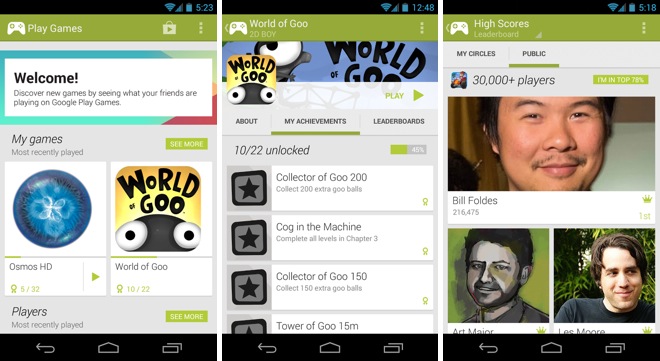
Google has released a new dedicated app for all the games on the Play Store, called Google Play Games. This app puts focus on discovering new games as well as tracking your achievements and scores as well as playing multiplayer games with your friends. It’s more or less the Game Center equivalent for Android.


The Play Games app looks quite similar to the new Play Music and Play Movies apps. You can see a list of your friends from Google+ with details about the games they have and their achievements. Currently, not a lot of games support this feature so you’re likely to see mostly empty profile pages.

The app also has a featured games section where it highlights new games. Below, it suggests people that you may know but aren’t already in your Google+ circles.

The app keeps a list of your own games, along with recently played ones and your achievements. Just like the Play Music, Movies or Books app, you can’t actually purchase anything from this app but are directed towards the Play Store app when you hit the purchase button. You do see the list of achievements (including the ones you’ve unlocked) and leaderboards for that game, which is not visible on the Play Store.

The Play Games app is now available on the Play Store and can be downloaded from the link below.

Download


Read More
No comments:

Monday, July 8, 2013

How to unlist an Android device from Google Play?

If you have had a few Android devices with the same Google Account, you must have observed that when you find an app to install, it presents you your previous devices as well, which you may no longer be using any more.

As in the above illustration, I no longer use the ZTE BLADE but it is still shown.

To Remove an unused Android Device on Google Play account, do the following -
  • Log in to Google Play Account
  • Scroll down to the bottom of the page > My Orders & Settings link
  • Click Edit
  • Uncheck "Shown in menus" corresponding to the device you want to hide.
  • Click Update


Now you should not see the old device when you are looking for a new app to install.


Note: The above steps only hides device and does not remove a device's association with Google Account.

Check out a discussion on XDA DEVELOPERS on how to remove device from Google Account.

Before you handover an Android device to someone or selling off, doing a factory reset is a safe thing to do.

Read More
No comments: