Showing posts with label Google. Show all posts

Sunday, August 4, 2013

5 Tricks to Increase Google Page Rank for Your Blog

Google page rank is an elusive term that most bloggers don't completely understand. In fact, there are probably few people in the world who completely understand it, because Google keeps the secrets of its page rank algorithm very guarded. Boosting your Google page rank isn't something you can do in a day. If it were, everyone would have a Google Page Rank of 10. Keep reading to learn a few of the tricks to increase your blog's Google page rank that are fairly easy to implement over time.


1. Get Incoming Links from High Quality Related Sites
The best way to increase your Google page rank might not make a difference over night, but it will make a big difference in time. The key is to get incoming links to your blog from highly authoritative and well-trafficked websites and blogs that are related your blog's topic.

For example, if you write a blog about finance, getting a link from The Wall Street Journal website would give your blog a big boost. If you could get more high quality links from popular sites such as Fortune.com, SmartMoney.com, and so on, your blog's Google page rank would most certainly jump.

2. Remember to Use SEO Techniques
Search engine optimization is an important part of increasing Google page rank. Read the top 10 SEO tips, and make sure you're using them.


3. Write Original Content
Do not copy content from another site. Even if you're copying and republishing your own content from one page or one site to another, do not do it. Google's algorithm cannot tell the difference and will either give the originating site the credit and downgrade the others or downgrade all of the sites that publish the duplicated content. Google acts harshly toward any kind of content scraping, even if you're completely innocent. Once your page rank is downgraded, it can be nearly impossible to get it back up again.


4. Don't Go Link Crazy
Many bloggers hear that it's important to have incoming links to boost their blog's Google page rank, so they start leaving comments anywhere and everywhere across the web, participating in random link exchanges with anyone who is willing to participate, and so on. Remember, as the first item on this list says, Google's algorithm cares about quality links, not quantity. In fact, your page rank could be downgraded if your blog is deemed to be little more than a bunch of links.


5. Write Great Content
If you write great content, people will want to link to it, particularly high quality websites. Get on the radar screen of popular bloggers and websites by leaving comments, writing guest posts, participating in forums, emailing directly, writing articles, and so on. Build relationships with people who write for high quality sites, and the number of quality, incoming links you get to your blog will grow organically over time.

Read More
1 comment:

Monday, July 29, 2013

Chromecast is smart stick for your TV that costs just $35


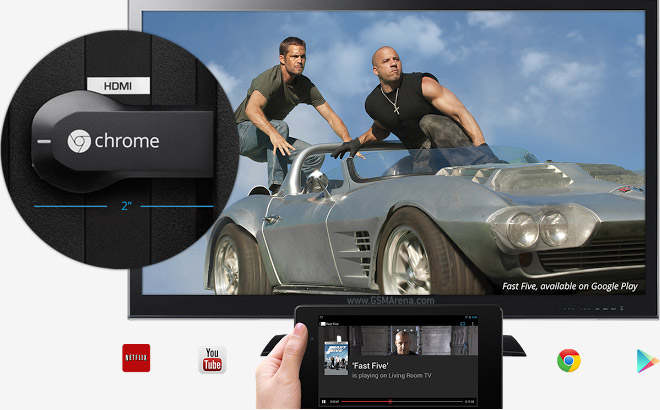
Google unveiled a smart HDMI stick for TVs – unlike most sticks we’ve seen so far, Chromecast runs a simplified version of Chrome OS rather than Android. It integrates with Google services like YouTube, Google Play Music, Google Play Video and the Chrome app (on a phone, tablet or laptop). Long story short, its the Nexus Q done right.

How does Chromecast work? Say you’re viewing a YouTube video on your phone (Android or iOS) and hit the Chromecast button. The device will switch on your TV if it’s off, change the input so that the TV displays that feed and start playing.

Multiple devices (you, your friends and family) can add videos to the playback queue, searching for new YouTube videos doesn’t disturb the playback on the TV. It’s not just YouTube, the Google Play Movies and the updated Netflix app supports it too.

You can control playback from the phone – change volume with the volume rocker and skip videos straight from the lockscreen. There’s more – if you have to go out, you can hit the Chromecast button again and playback jumps back to your phone. Or you can move it to a tablet instead, it will continue from where it left off.

Chromecast also handles DJ duties – you can play music from the Google Play Music store and Pandora too (all of this is compatible with iOS devices as well).

Another thing the little stick can show on your TV is Chrome tabs – you can “project” a Chrome tab to the TV and browse photos on Google+ or even watch a video on Vimeo (this feature is still in beta). New features can be added by third party devs through the Google Cast SDK for Android, iOS and Chrome (browsers for Windows, Mac OS and Chrome OS).

Chromecast is a 2″ stick that plugs into a free HDMI port on your TV and requires external power through a microUSB port. But best of all it costs only $35 (the Nexus Q was ridiculously priced, it would have never worked). It will be available later today in the US – you can snag it from the Play Store, Amazon.com and BestBuy.com. Best Buy stores will carry it from July 28. If you buy a Chromecast, Netflix will give you a free 3 month subscription. Availability in other countries coming soon.

Read More
No comments:

Sunday, July 28, 2013

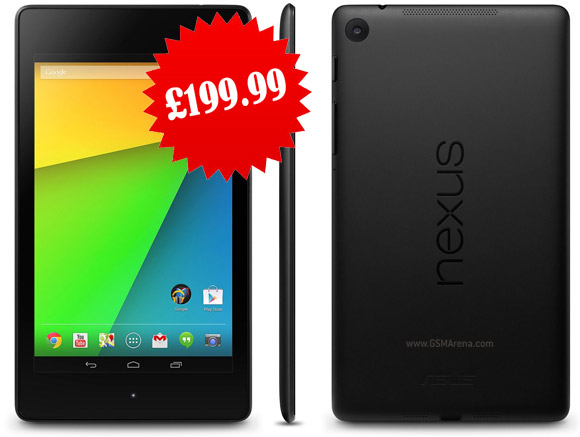
Google Nexus 7 priced, up for preorder in the UK


The Nexus 7 refresh introduced by Google yesterday is now up for preorder in the UK. Unfortunately the availability news isn’t great with Britain residents having to wait until September to get the hot slate.
The tablet will be priced at £199.99 for the 16GB model, and £239.99 for the 32GB variant.

Models can be pre-purchased now from PC-World and Currys.

The exact shipment date is listed at September 13, and seeing as how both these retailers were launch partners for the original Nexus 7 last year, it’s unlikely that this date will change. Unfortunately, neither of the models for sale offer LTE support, which is likely to be released at a later date.

The UK will be one of the second wave of countries to receive the new Nexus 7, alongside Germany, South Korea, Japan, Spain, Canada, France and Australia.

Read More
No comments:

The new Nexus 7 vs. iPad mini: Tech Specification Shootout


It comes packed with features such as 7-inch 1920×1200 HD display with 323 ppi, a quad-core Qualcomm Snapdragon S4 Pro clocked at 1.5GHz, along with an Adreno 320 GPU and 2GB RAM.
So how does it stack up against the iPad mini? Here’s a detailed comparison table where we have compared the tech specs of the new Nexus 7 and iPad mini.

As you can see from the tech specs, Google has certainly upped the ante with the launch of the new Nexus 7 with the Retina-like 1920*1200 (1080p) resolution Display, faster processor, lot more RAM, surround sound, and starting at an extremely affordable price of $229, which is $100 cheaper than the iPad mini. At that price difference, Apple will have a tough time convincing people even if it launches the iPad mini with Retina Display and drops the price of the current generation iPad mini to $249. The only saving grace for Apple is its app ecosystem, which has over 375,000 apps that designed for the iPad.

Do you think, Apple will, for a change, have a tough time competing against an Android tablet?

Read More
No comments:

Wednesday, July 17, 2013

How to Find a Job at Google or Facebook easily?

Today I have something different & interesting for you. This post covers how to find a job at Google.com and Facebook.com. I guess everyone who is reading this article knows (Google & Facebook), Google is the biggest online company which manages a huge number of products and has the most widest team to manage these all products. Getting a job at Google or Facebook would be a last desire of any IT professional. Working at those companies requires something special in you. They need smart people from the world who know how to face challenges, how to tackle out solutions for critical problems and how to make changes to the internet. Google is the home of smart people, and everyone working there is the best in the subject he/she was appointed for. Working at Google is not simply doing a regular job, but it is doing something special, something innovative. And the first priority is the creativity.

How to Find/Get a Job at Google?

Working at Google or Finding a job at Google has been simplified by G itself, everyone who wants to join Google will be passing through the same process which is to; first make a conversation with a recruiter, then a phone interview and finally an interview at a physical office. Before you think to join Google, have a look at "Life at Google" page which is a fresh & heart-touching page, you can just take a tour to meet the people already working at Google, see their faces how happy they are.

Visit Life at Google now


You'll find many IT professionals out there who are working at Google, there are also feedback of Google's employees, they are working on different products run by Google. Google says: Do Cool Things that matter. You can also visit jobs page where you may see an innovative office picture of Google. Click Here However, jobs list at Google is categorized by locations, so you may visit the locations page to find the job at your nearest location, and Google always prefer local people for the regional offices. Here is the locations page you can visit to find jobs in all countries, regions & cities:

Find a Job at Google By Location


Google has 70+ offices in more than 40 countries and growing, In Asia Google has offices in Singapore (Singapore City), Hong Kong (Hong Kong city), Thailand (Bangkok), Indonesia (Jakarta), Malaysia (Kuala Lumpur), India (Mumbai, Gurgoan, Hyderabad, Bangalore), Philippine (Manila), South Korea (Seoul), Japan (Tokyo, Osaka) & Taiwan (Taipei, Ghangua county). You can find the location/address of the office along with contact numbers & fax etc.

You may also find the jobs categories when you click on a location such as Kuala Lumpur (Malaysia) or just click "View Jobs in Kuala Lumpur" at the top right to view all available jobs.

Do You Want to know about all available jobs? just visit below link to either find all available jobs on a single page with pagination, or just simply search your desired job:

Search a Job at Google


You may also be interested to visit this page for knowing how Google hire people from around the world:


How Google Hire people 

On above page, you can find all the information about how and for what Google hire new people. The process to join Google is easily explained.

What Facilities does Google provide?


Simply great environment, Smart Salaries, Taking care of employees, Amazing Support & much more than your expectations. Employees live & work like a family. So if you have the smartness & objectives then just go and find your desired job at Google and apply for that. Google needs people/professionals for working on different products such as IT managers, product managers, software Engineers, Country managers, regional offices managers etc.

How to Find a job at Facebook?


Facebook is the giant of social media networks and hundreds of people work at Facebook as well, and Facebook always looks for new developers and people who have innovative minds, you can simply visit below single URL to find all the information about Careers/jobs at Facebook. You can easily find/search the job by Location.

Find/Get a Job at Facebook

You need to just scroll down the mouse and read all the information you need in order to find a job at Facebook. So we tried to give you information as much as possible, now its your turn to go there and find your desired job very easily, and be the part of world's greatest people. Be More Smart At Google. - See more at: http://www.bestbloggercafe.com/2013/07/get-job-at-google.html#sthash.UicPFDlo.dpuf

Read More
No comments:

Monday, July 8, 2013

How to unlist an Android device from Google Play?

If you have had a few Android devices with the same Google Account, you must have observed that when you find an app to install, it presents you your previous devices as well, which you may no longer be using any more.

As in the above illustration, I no longer use the ZTE BLADE but it is still shown.

To Remove an unused Android Device on Google Play account, do the following -
  • Log in to Google Play Account
  • Scroll down to the bottom of the page > My Orders & Settings link
  • Click Edit
  • Uncheck "Shown in menus" corresponding to the device you want to hide.
  • Click Update


Now you should not see the old device when you are looking for a new app to install.


Note: The above steps only hides device and does not remove a device's association with Google Account.

Check out a discussion on XDA DEVELOPERS on how to remove device from Google Account.

Before you handover an Android device to someone or selling off, doing a factory reset is a safe thing to do.

Read More
No comments: