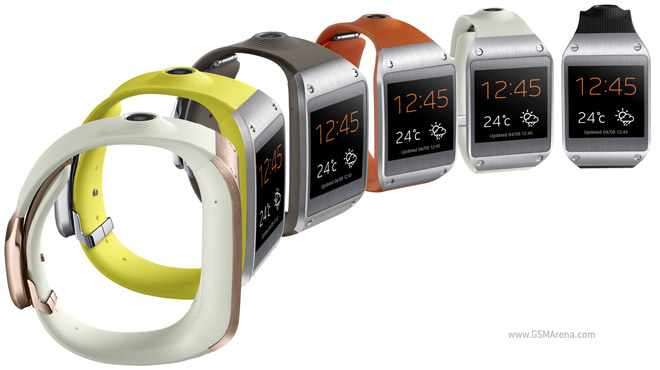
Samsung jumped head first into the smartwatch field with the Galaxy Gear. It’s made out of stainless steel for the body and futuristic material for the strap. The heart of Gear is a 1.63″ Super AMOLED touch screen with 320 x 320 resolution (that’s 277ppi pixel density).
In a throwback to the S9110 watch phone, the Galaxy Gear features a speaker and mic, so it can handle calls (with a noise cancellation mic), but also understand voice commands with S Voice.
Unlike the rumors, the Samsung Galaxy Gear does not run Android, but needs a connection to a Galaxy device – Galaxy S III and S4, Note II and III, Note 10.1 2014, the older devices (that is not Note III or 10.1 2014) will need a software update.
The connection is achieved through power-efficient Bluetooth 4.0 LE. The watch itself is powered by an 800MHz processor with 512MB RAM. A 315mAh battery provides juice for “more than a day”, which is another way of describing the rating of 25+ hours.
The watch uses its Bluetooth connection to the smartphone for the Auto Lock feature – if you’re over a meter and a half away, i.e. the phone isn’t in your pocket or backpack, it will lock the phone. The Find My Device feature will help you get your smartphone back by making it beep, flash its lights and vibrate.
The Samsung Galaxy Gear features an autofocus 1.9MP camera with a BSI sensor that can capture 720p video. It can even do Sound & Shot snaps. All that is stored on 4GB of internal storage.
That’s great for capturing fleeting moments of your life which will be gone by the time you take your phone out of the pocket. With an accelerometer and gyroscope the Gear will also help your workouts by counting your steps and tracking your runs.
The Galaxy Gear measures 36.8 x 56.6 x 11.1mm and weighs 73.8g. It will be available later this month in most of the world, but the US and Japan will get it in October. Color options for the wrist band include Jet Black, Mocha Grey, Rose Gold, Wild Orange, Oatmeal Beige and Lime Green.
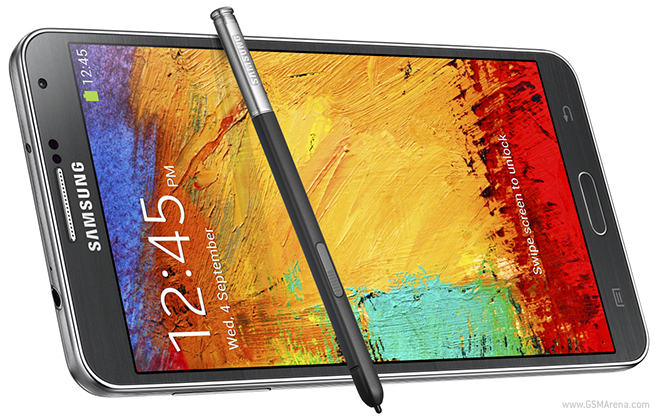
Yesterday, Samsung took the wraps off the Galaxy Note 3 smartphone at IFA in Berlin. The company’s latest flagship comes packed with features, as is usual for a Samsung smartphone, and there is a whole bunch of new stuff to go alone with the stuff we have already seen in the past.
To show off all the new features of the Galaxy Note 3, Samsung has now released a fairly lengthy six and half minute long video that goes through each of them. Let’s talk about them briefly before we get to the video.
First of all is the design. Unlike the Galaxy Note II which looked more or less like a bigger Galaxy S III, the Galaxy Note 3 is, ahem, notably different from the Galaxy S4. Samsung has eschewed the strange pattern and glossy finish back cover of the S4 for a faux leather finish for the Note 3, complete with a fake stitching pattern around the edges. While it’s not quite the real deal, it looks significantly better than the previous Galaxy smartphones and is also said to have a better feel in the hand.
Around the edges, Samsung has once again gone for a metal finish but with a serrated pattern that is said to resemble the pages on the side of a notepad. The choice of making it simultaneously look like metal as well as paper is, in the very least, oddly conflicting. The front of the device retains the Galaxy family look, which is to say it looks dull and uninteresting.
The Galaxy Note 3 comes with a whole range of flip wallet covers in multiple colors, including ones with a window on the front to quickly access the display.
In terms of hardware, the Galaxy Note 3 runs on either the quad-core Snapdragon 800 clocked at 2.3GHz or the octa-core Exynos 5 clocked at 1.9GHz for the A15 cores and 1.3GHz for the A7 cores. There is also 3GB of RAM, 32/64GB internal storage space with microSD card slot, 13 megapixel rear camera capable of 4K recording at 30fps on the Snapdragon 800 model and 1080p60 recording on the Exynos model, 5.7-inch, 1920×1080 resolution Super AMOLED display, 3,200mAh battery and the latest Android 4.3 Jelly Bean.
The software is where the real innovation has happened and once again Samsung has made good use of the capacitive stylus that comes with the device. Now you can tap anywhere on the screen by pressing the button on the S Pen and bring up a special Air command menu, with options such as Action Memo, Scrap booker, Screen Write, S Finder and Pen Window.
Action Memo lets you quickly take down a memo by drawing it with a stylus and depending upon what you wrote you get options such as phone, contacts, messaging, email, browser, map and task.
Scrap booker lets you collect content such as videos, images, web pages, etc. and place them in your scrap book, which you can then share with others.
Screen Write lets you write directly on your screenshots so they are more personalized.
S Finder lets you find any content on your device by drawing the text with the stylus. The phone will even find handwritten text within saved memos that match your entered text.
Lastly, there is Pen Window, which lets you draw a small square on the screen and select from a small group of apps that you can open in that small square. You can have apps like calculator, clock, browser, phone, contacts, etc. that hover on top of your existing window so you don’t have to leave your existing app to, say, make a quick calculation.
Other than that, Samsung has also updated the S Note app with new UI and features and it also syncs with your Samsung or Evernote account.
The multiwindow feature that debuted with the Note 10.1 has also been improved. You now have more apps to choose from and with some apps like ChatOn you can have two instances of the same app running so you can chat with multiple people simultaneously. You can also easily drag and drop context around between the two windows.
Finally, there is a new My Magazine feature, which brings together all your news feeds and social network updates into one magazine like app that sort of looks like Flipboard.
You can check out all the new features in action in the video below.
Samsung Galaxy Tab 3 Kids edition launches next month
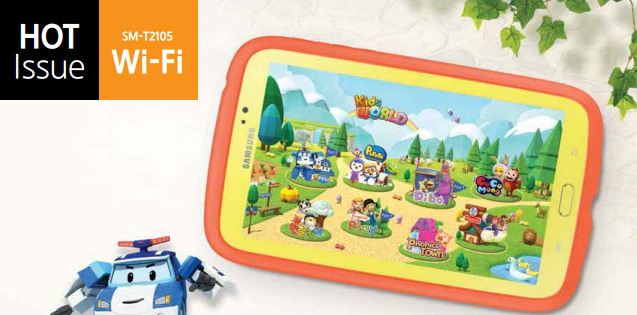
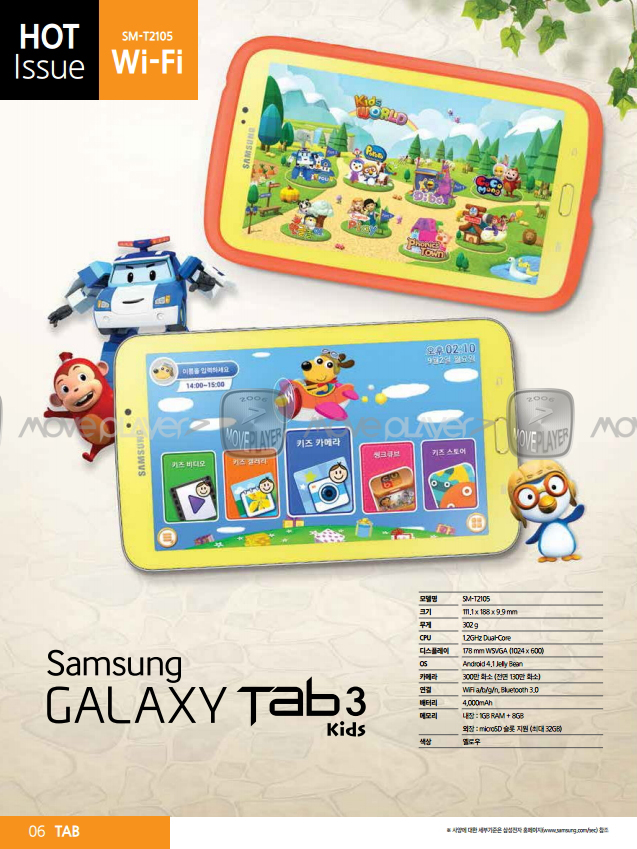
Samsung seems to be preparing a Kids edition of its Galaxy Tab 3 7.0 slate. The tablet is called Galaxy Tab 3 Kids and will launch this September.
The specs of the customized Tab 3 Kids are identical to those of its vanilla sibling – it comes with a 7″ TFT display with a resolution of 1024×600 pixels, runs on a 1.2GHz dual-core processor and features a 3MP camera, 1GB of RAM and 8GB expandable storage.
The Tab 3 Kids runs on a deeply customized Android 4.1 Jelly Bean with completely redesigned and simplified UI. Samsung will preload lots of educational software, games and multimedia for the kids too.
There is no official announcement yet, nor is there a rumored date and price. Samsung’s official website for Korea has already listed the slate’s manual, so we guess the Galaxy Tab 3 Kids will indeed hit the stores very soon as the source suggests.
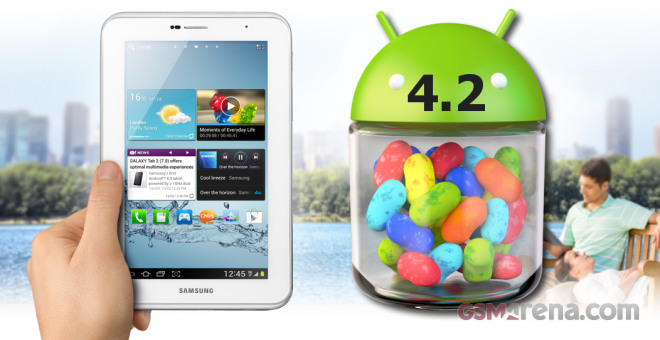
Samsung Galaxy Tab 2 7.0 is part of the long list of Samsung devices that were destined to get the Android 4.2 according to an earlier leak. The wait for the owners of the slate is now over as Samsung has just started seeding the Android 4.2.2 update for it.
Unfortunately, according to the previous info, this Android 4.2.2 update will be the last major one for the Galaxy Tab 2 7.0. Other Galaxy Tab 2 tablets will be soon getting the same update and the process is scheduled to complete by the end of September.
The Android 4.2.2 update for tablets brings minor but important improvements such as multiple user accounts, lockscreen widgets, DayDream, new dedicated notification panel, etc.
We still have some tiny hope that those devices supposed to end their life-cycle on Android 4.2 may get 4.3 considering how minor that one is, but we wouldn’t bet the house on it. Note that even if this is the last major update for the slate, you may get the occasional minor release to squash some bugs.
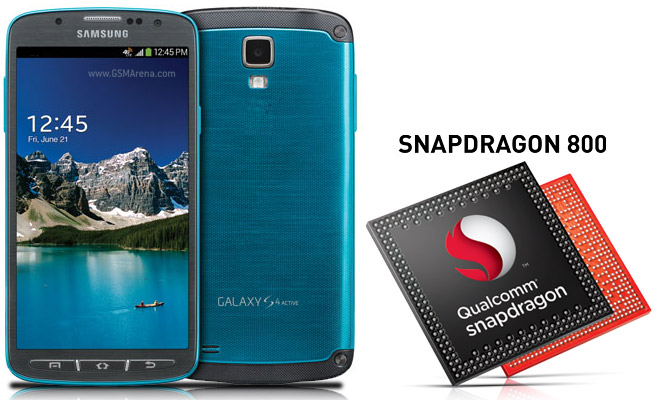
A South Korean version of the water-resistant Samsung Galaxy S4 Active called SHV-E470S popped up in GFXBench scores and wouldn’t you know it, it packs a Snapdragon 800 chipset and not the Snapdragon 600 that the international version has.
At this point this should come as no surprise – we saw a Snapdragon 800-powered Galaxy S4, a Snapdragon 600 Note II, dual-mode S4 and S4 mini, Samsung is trying out all the combinations.
The benchmark detected a quad-core processor at 2.3GHz with Adreno 330 GPU in an MSM8974 chipset, a.k.a. Snapdragon 800. The score for the off-screen test is 25.9fps, when the Snapdragon 600 version did 16fps, the I9505 Galaxy S4 did 17.1fps and the Snapdragon 800-packing Sony Xperia Z Ultra does 23.1fps.
GLBenchmark 2.7 T-Rex (1080p off-screen) Higher is better
Samsung Galaxy S4 Active (S800) 25.9 Sony Xperia Z Ultra 23.1 Samsung Galaxy S4 (S600) 17.1 Samsung Galaxy S4 (Octa) 17.1 Apple iPad 4 16.8 Samsung Galaxy S4 Active (S600) 16 Google Nexus 10 13.9 LG Optimus G 13.9 Sony Xperia Z 13.5 Sony Xperia Tablet Z 13 Sony Xperia ZL 12.8 Samsung Galaxy Note II 4.9
The SHV-E470S Galaxy S5 Active also probably supports LTE-Advanced, same as the SHV-E330S Galaxy S4 LTE-A.
Note that those are phones for South Korea and there are rumors of an I9506 Galaxy S4, which will bring Snapdragon 800 power internationally. Fingers crossed that the new Galaxy S4 Active will have an international version too.
Rumors have it that Samsung has its first “true octa-core” CPU in the works. This follows MedaTek’s announcement of the first eight-core processor a few days ago.
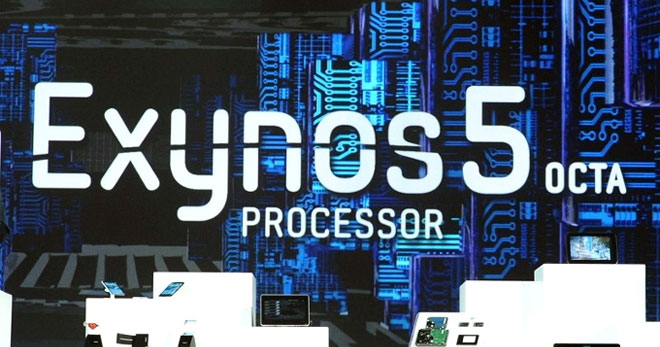
The Samsung Exynos 5440 Octa is the company’s latest octa-core CPU at the moment, but technically it isn’t a true octa-core since a maximum of four cores can work at once – either the four Cortex A7 or the four Cortex A15 cores.
There’s no information whether Samsung has worked out a way to provide a reasonable battery life with eight cores working full time just yet. Word from around the web is that the company will be ready in 2014 at earliest to provide information regarding its purported true octa-core processor.
Until then, we’ll have to make due with the Exynos 5420 Octa chipsett that again has the quad Cortex A7 and Cortex A15 cores, but are slightly overclocked to provide more punch than its predecessor. We’ll see just how powerful it is when we see it powering the Samsung Galaxy Note III in September.
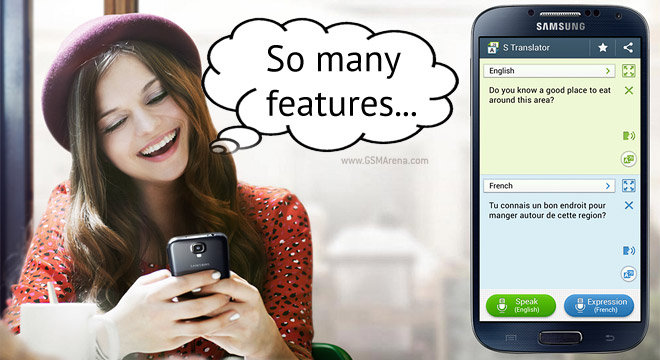
Samsung’s TouchWiz is loaded with ridiculous amounts of features (especially on the Galaxy S4), it took even us quite a while to find them all. Not that we’re complaining – as gadget geeks finding new toggles and buttons to play with is half the fun of a new phone. Yet, Samsung takes pity on those less tech inclined and posted a list of 10 features the Samsung Galaxy S4 has out of the box that you might have missed.
They range from “that’s nice, I guess” to genuinely useful features.
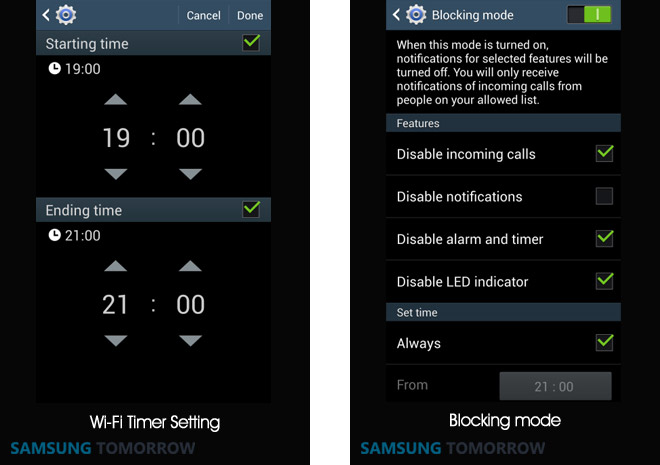
One great feature to save on battery life is the Wi-Fi Timer. It’s a little hard to find – Settings > Connections > Wi-Fi > Advanced >Wi-Fi Timer – but it can automatically turn on Wi-Fi and then turn it off again at preset time. For example, switch it off during the night and then back on in the morning so you don’t miss any notifications.
The notifications that arrive in the middle of the night would have woken you up, so it’s better this way. What about meetings, school hours and other times you don’t want noisy notifications interrupting? Blocking mode (Settings > My device > Blocking mode) can turn off select notifications (even the LED indicator) either manually or during a select time period. You can also add contacts to the Allowed list so you don’t miss any vital calls.
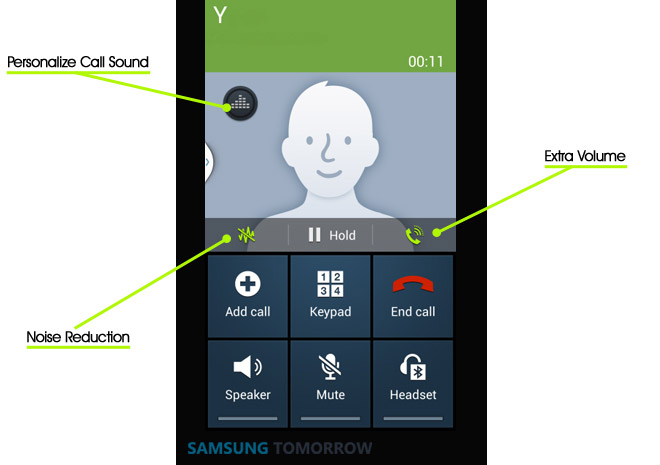
What if you get a call in a noisy environment? The Samsung Galaxy S4 screen has several buttons on its in-call screen to help. One button can boost the volume, another can activate noise reduction so the other side can hear you as well and you can even use the equalizer to tweak the in-call volume to your liking.
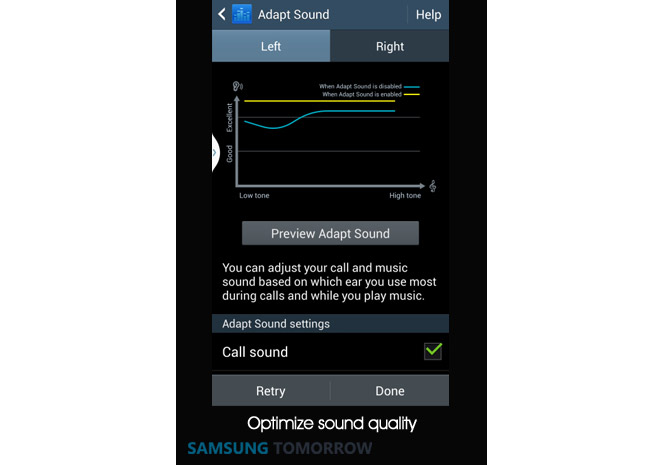
Speaking of sound tuning, the Adapt Sound will tune the music player for you. You just have to plug in your favorite set of headphones and go through the test which determines the capabilities of your headphones and tunes the equalizer appropriately. The Preview feature will show you what a difference that made.
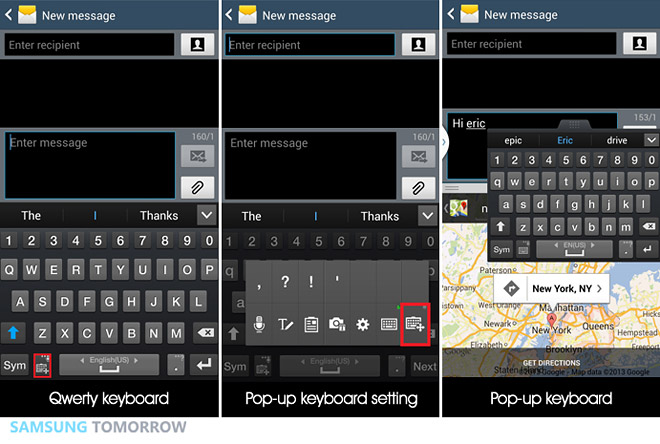
The 5″ 1080p screen of the Galaxy S4 is big enough to run several apps simultaneously. The detachable keyboard complements that quite well – you can use it to type in one app (an SMS or in a chat client), while the other half of the screen shows you a map, your schedule or anything else that might be relevant to the conversation.
There’s more. For watching videos, you can zoom in with a pinch gesture, adjust the sound and brightness during playback straight from the screen. Or if you’re watching the TV, you can put the IR remote feature WatchON in the notification area or as a widget on the lockscreen.
The notification area can be tweaked too – rearrange the quick toggles, view all quick toggles directly with a two finger swipe, even hide the brightness slider. The lockscreen has plenty of options too – you can have an easy camera launch gesture (like on stock Android) and you can change the personal message on the lockscreen, even pick the color and font.
Once relegated to cheap, low-margin phones, Android’s leading vendor Samsung has now overtaken Apple as the world’s most profitable smartphone vendor. Samsung’s estimated $5.2 billion in profits from phone sales compares favorably with Apples’s estimated iPhone profits of $4.2 billion, according to Strategy Analytics — the first time in nearly four years that the iPhone hasn’t held the profit crown.
Samsung’s profit lead is driven by a continuing boom in unit volume. Strategy Analytics estimates its smartphone market share grew to 33.1% on sales of 76 million phones during the quarter. Apple is estimated to have a 13.6% share on sales of 31.2 million phones. While Apple sold nearly 20% more phones than the same quarter a year ago, it hasn’t kept pace with Samsung’s torrid growth — especially in the fastest growing overseas markets.
More worrying for Apple than losing its profit crown is its relative weakness overseas. Sales in bellwether market China were actually down $3.6 billion quarter-to-quarter, with Europe and the rest of Asia also weaker. Without introducing less-expensive alternative versions of its iPhone, it is likely Apple’s international market share will continue to erode as less-expensive Android phones continue to improve in functionality.
Of course, this quarter represents a trough for Apple, pending expected new product announcements in the fall. It is similarly a bit of a peak for Samsung as its flagship Galaxy S4 has just rolled out, but the numbers are a wake up call that the iPhone-dominated smartphone sector is now up for grabs. Many developers have been focusing primarily on iOS because of its large, unified market share and issues with Android fragmentation. With the Android platform settling down and Google taking more control of its APIs, these sales figures will provide additional incentive to shift resources towards Android development.
In response to analysts’ questions about the growing clamor for a less-expensive iPhone, Apple CEO Tim Cook took a page from Amazon’s Jeff Bezos’ book, essentially telling analysts to “trust me.” However, unlike Steve Jobs, Cook hasn’t earned that kind of trust from the markets yet, which partially explains Apple’s continued stock price slide. Nearly flat since Cook was announced as CEO in 2011, Apple’s stock (AAPL) is down over 20% in the last year, while both the NASDAQ and Samsung are up by about the same amount.
Conventional wisdom says that Apple either needs to innovate in a new, blockbuster category — perhaps the much-rumored Apple iTV — or fix the bleeding in smartphone market share with lower-cost models for international markets. Apple is a company that has often proved conventional wisdom wrong, but if it’s planning to do so this time it will have to do it under a new CEO.
Intro:The world's best parking games! Real Parking 3D Game! World Best 3D Parking and Racing Game!! Seen so far is not the most realistic Parking. Actual and parking skills will be taught. To do this, you want to succeed and parking a bit faster would challenge Turn your parked in a fast time, the success of their new record Tip . Drag it to the center of the screen, you can move the camera. . To go back to the place that if you turned the handle
This past week we have been enjoying a few more mobile options from the folks at Samsung. We reviewed their new Galaxy S 4 Active, and now we have the wireless charging dock available for some quick hands-on time. Samsung’s charging kit you are seeing here works with the Qi standard, just like many wireless chargers from Nokia, LG, and even the model for the Nexus 4. Samsung delivers a new battery cover to complete the task, so take a peek below.
Samsung finally unleashed the wireless charging kit on their online store recently, and for those interested we have a few thoughts on the package. The charging dock itself is quite large, much bigger in fact than both the Nexus 4 and LG’s wireless chargers. It has a durable and hefty feel, and a nice rubbery coating to keep the phone safe from any scratching while you toss it on and off for a quick charge.
While Samsung’s Galaxy S4 (now) comes in a wide array of colors, sadly the charging dock only has one option available: grey. Of course anyone should know the dock will be plugged into a nearby outlet using the same micro-USB cord as usual, then you just toss your phone on that charging dock platform for juice. Samsung makes it very apparent on the device with a sticker, that you’ll need to be perfectly aligned. This held true too, slight turns and the phone wouldn’t charge. So long as the middle is centered, you’ll be good though.
Unlike the Nexus 4, DROID DNA and a few others, the Galaxy S4 requires a replacement battery cover to enjoy the wireless charging capability. One which won’t be provided in the box, but a quick $39 will get you the color of your choice. Verizon and most carriers have them in store and online in both white or black. Sadly, you’ll also need to spend $49 for the charging pad, but the convenience may be worth it to some.
Speaking of the replacement battery back. It’s quite thick, and as you can see in the image below there’s a noticeable increase in thickness, but overall nothing to be concerned about. Compared to the Active below, you can see the difference. As a comparison the stock GS4 back is flush or thinner than the camera. Here you can see the lip added with the new back. The GS4 is thin already, so this almost gives it a more premium feel as it adds to the overall feel in your hand. That’s my opinion at least.
Sadly we wish this could have came standard, just like it did with the Nexus 4, HTC DROID DNA, Optimus G, and a few others. However, if you have the LG wireless charging kit, the Nexus 4 charger, or even some 3rd party Energizer models or even one from Nokia, they’ll all work with ease. All you’ll need is that replacement battery cover.
Take a peek at a few more pictures below, then decide if the near $90 price is worth it to you. We love the convenience personally, just wish it would have came standard. Not as an aftermarket purchase.
Intro:Now you can play the highly acclaimed Brothers in Arms series for FREE! Download data pack!Prepare to step onto the most intense and explosive battlefields of WWII. ******************************************************* PLAY FOR FREE Download the game and start playing for free in Story mode or Multiplayer. Earn Dog Tags and XP as you play that can be used to unlock tons of extra features and gear to customize your soldier, or purchase Medals to unlock them faster. It’s up to you! JOIN YOUR ALLIES ONLINE Challenge up to 5 friends to multiplayer battles on five maps in 3 different modes (Free For All, Team Deathmatch and Domination). You can connect locally via Bluetooth or even go online with Wi-Fi to battle friends anywhere. A FIGHT ACROSS THE GLOBE Experience every front of the war with 50 missions to unlock across 5 locations: the Pacific, Normandy, North Africa, Germany and Sicily. WAR MACHINES Take control of 3 different vehicles including the tank, off-road vehicle or glider to overrun your opponents or to make a daring escape. You can even jump behind the vehicle turret to lay waste to foes with the machine gun. THE BATTLE COMES TO LIFE The stunning graphics and authentic settings are inspired by real-life battlefields from WWII and created in detailed 3D. AN EPIC EXPERIENCE Witness compelling cinematic moments with more interaction between you and your squad members that deepens the gameplay. AN ARSENAL AT YOUR DISPOSAL Grab a wide variety of historically accurate weapons including machine guns, bazookas, sniper rifles and flamethrowers. ******************************************************* Visit our homepage at www.gameloft.com. Follow us on Twitter at http://twitter.com/gameloft or like us on Facebook at http://facebook.com/gameloft to get more info about all our upcoming titles. Check out our videos and game trailers on www.youtube.com/gameloft. Discover our blog at http://blog.gameloft.com/ for the inside scoop on everything Gameloft.
Intro:Are you a Counter Strike fan? Then this Fan app is for you! We love this game and so do millions of others around the world, and we created an app for all of you fans out there like us who are addicted to the game. Please note this is not the actual Counter Strike game game.
Category:Shooting Status: Free Ver.:1.6 Size: 45.4M System: Android and above
Curiously, many high end handsets are yet to get the latest Android version
Samsung is all set to roll out the Android 4.2.2 Jelly Bean version for its mid-range Galaxy Grand Duos, according to a reports.
It is to be remembered that Android 4.2.2 is the latest version of Android operating system and many high end phones are yet to get the version.
Meanwhile, SamMobile has claimed to have received an official test ROM based on Android 4.2.2 for the Galaxy Grand Duos. Now if there is a test ROM, there will obviously be a final one which will be pushed as update. However, the report does not talk about any deadline.
The Android 4.2.2 update is also likely to be released for Galaxy S III, Note II and a couple of Samsung's tablets. Samsung Galaxy Grand Duos GT-I9082 features a 5 inch TFT LCD WVGA (480×800) resolution display, a 8 megapixel camera and a 1.2 GHz processor.
With the new update there will be new features like transparent notification bar, Smart Stay, Light effect by unlocking, Page Buddy and Day dream.
SamMobile says that the device itself feels pretty fast compared with Android 4.1.2 and the battery life seems to be improved. There is no new feature in the update for the camera though, the report further claimed.
Rooting your device is basically like gaining administrative rights on a PC. You're able to install custom firmware, remove unwanted bloatware applications and generally get a little more hands on with the core functionality of the phone. For seasoned Android veterans, rooting is practically the first thing they do when they take a new phone out of its packaging, but if you're a novice, then you might want to exercise a little caution.
As with any process which involves tampering with your phone's firmware, rooting your device can have negative as well as positive consequences. Although it's unlikely, you could end up with a bricked and unresponsive handset -- so consider yourself warned. You'll also void your warranty.
Another thing to note is that this guide relates to the GT-i9505 with the Snapdragon 600 chipset, and not the octo-core variant. This process will also not work with S4 handsets which have the a software baseband ending in MDM. You can find out your baseband reference by going to Settings > More > About Phone.
And finally, this guide assumes you're using Windows 7 on your PC.
With that out of the way, let's get on with the rooting, shall we?
1. Back up your phone
Although this process won't wipe any data from your phone, it's always prudent to make sure you've backed up any precious data before proceeding. CNET UK cannot be held responsible for any damage or data loss you may suffer as a result of following this guide.
2. Download Motochopper
This is the application which performs the rooting process. Although it's been developed for Motorola devices -- hence the title -- it works on certain Qualcomm-based phones, too. You can Download it from here. Once you've done that, extract the files.
3: Switch on USB debugging
To perform this step, you'll need to activate your S4's developer menu if you haven't done so already. Navigate to Settings > More > About Phone. Scroll down to Build Number and tap it seven times. This will enable the Developer Options menu, which you can find in the More area of the Setting menu. Navigate there and then tick the USB Debugging box. Next, plug your phone into your PC using your standard micro-USB cable. You'll have to wait for Windows to install the necessary drivers.
4: Fire up Motochopper
Locate the Motochopper files you extracted earlier and double click the 'Run' executable. You'll see a screen like the one below:
5: Follow the on-screen prompts
Press enter to root your device. Your Galaxy S4 should pop a notification message up -- simply tap 'OK' to proceed with the rooting process. If you don't see a message, just double check that you've got the latest Samsung drivers and that USB debugging is definitely switched on.
Once the process is complete, you'll see a screen like the one below. Press enter, and your freshly-rooted Galaxy S4 will reboot. Open up your app drawer and you'll notice that the all-important Superuser application has been installed. Welcome to the world of rooted Android!
have claimed that the forthcoming BlackBerry A10 smartphone is going to be the most capable, powerful BlackBerry yet with a media-friendly 5-inch Super AMOLED display.
More interestingly, the BlackBerry A10 will come with "a huge focus on gaming."
Despite being geared towards "power and gaming," the A10 will only come with a dual-core processor. Apparently, BlackBerry has been unable to make the jump to a quad-core architecture - either due to concerns over battery life or because of difficulties optimising BlackBerry 10 for a quad-core setup.
Still, this dual-core CPU will reportedly be backed by a healthy 2GB of RAM, and the BlackBerry A10 will apparently adopt the same silicon as the iPhone, with separate CPU and GPU processors. In the iPhone's case, this has certainly resulted in a string of highly capable gaming smartphones.
The report also has something to say about the BlackBerry A10's design. It'll apparently closely resemble the Samsung Galaxy S4, though if anything it'll be larger. It's also described as being "more rounded and less aggressive-looking" than the BlackBerry Z10.
It's claimed that we can expect to see the BlackBerry A10 launching some time this autumn.
Three weeks back I bought my first android Smartphone, the Sony Ericsson Xperia 10. Before buying the phone, I was using a BlackBerry 9800 with Airtel monthly BIS subscription and I thought all was well. Well, the android phone did what I never expected. The 1GB data allocated to monthly BIS subscription with Airtel was finished within the first week of the service.
Though some people might see 1GB data as a small allowance, as an engineering student who is always busy reading, it takes me up to three – four weeks before I exhaust my data when I was using a BlackBerry device. This made think in the first place there is something wrong with this device, the Xperia 10.
After a long research online, I found out that the problem with data consumption is not from the device, but the OS. The sony xperia 10 runs on an android 2.1 gingerbread and the android operating system has a well known feature of consuming data due to some reasons listed below. Android users get their updates wirelessly compared to other operating systems like iOS which does its software updates over a wired connection via iTunes. It has a higher percentage of free apps compared to other platforms, and most of those apps monetize through ads. Android users are more savvy, the platform gets it popularity due to the ability to modify it. This is why most android users are programmers and tech enthusiast. It’s ability to tether easier than other device. The ability to multi-task easily, android lets lot of apps to run in the background.
After finding out the real cause of this problem, I decided to go for an unlimited internet data plan but was discouraged due to the fact that I don’t use my smartphone very well and that will a waste of money.
Must Read: Top 6 Reasons Why The iPhone Sucks
So, I went on the internet again to find ways I can minimize internet data consumption of my android phone and luckily, I came across DroidWall App. This android firewall app is a front-end application that allows you to restrict which applications are permitted to access your data networks. This is a perfect solution if you don’t have an unlimited data plan, or just wants to see your battery last longer.
To download this app to your android smartphone, a search for “DroidWall” on android market would provide the app for a free download. After a successful download, click on Mode to switch between white list and black list modes, mark the applications that you want to block or allow, then open the menu and enable the firewall.
If you want to quickly enable or disable the firewall, add the DroidWall widget to your home screen. You can also set a password lock for DroidWall by using the set password menu option. You can also set it to blank if you want to remove the password protection.
I am not sure if others are also facing the same but every time I connect my Samsung Galaxy Grand (GT-19082) to my PC ( running 32-bit Windows XP Service Pack 3), it prompts me to search and install drivers but it can't find one. I don't have this problem on my other Windows 8 64-bit laptop.
Now on the Windows XP, I connected Grand via USB by choosing USB option as USB Media Device (MTP). It prompts me to search and install drivers but it can't find any. Looking at the device manager shows -
When you connect a USB you get USB options in notification - MTP (as Media Device) or PTP (as Camera Device).
When I choose PTP (as Camera ), the device manager shows that it detects some. On Windows Explorer , only the phone's internal memory is accessible.
I still get a prompt to install some drivers...Still it is not able to install driver for GT-I9082.
Are you facing any such problem? Have you found a way to resolve it? If yes, kindly share .
Backing up contact is very important. We may lose our phone sometimes and all our contacts along with other files go with it. It is a time consuming task to get back your contacts again. So why not keep it safe?
There are various ways to keep a backup. Many keep contacts in their SIM cards but the space is limited. So if you are backing up contacts on SIM card, let it be your most important contacts. Anyway, that don't help if you lose the phone.
Your Android phone is normally linked to at least one account - at least a Google Account. So you can choose to sync contacts with it. I don't prefer to do this personally because my GMail has many other contacts that I don't need on my phone. It looks clumsy and messed up to see so many contacts that I won't even use. Likewise, you may have other accounts linked such as Whatapps, Facebook etc. And they too have contact sync options. So you can choose what to display in your contacts and what not to.
Choosing your contacts display in the contacts:
Open contacts on your phone
Press the MENU > Contacts Display Option
Select what to display as per your requirement
You will see various options and accounts to sync with.
You can choose all contacts or choose one. Phone is the simplest. Or if you don't have many then SIM is also fine.
Backup up contacts:
Your Android phone gives you various options to export/import to/from - SIM, SD Card etc. And if in case your contacts gets lost, you can restore from the backup file.
In case you lose your phone, your SD Card will also go along with it. So is your SIM card. So better try something else.
Why not backup to some other storage outside the phone? You can export to SD card and then keep this file on your computer or another storage. That way you can easily restore later.
Also, when using another phone temporarily, you can export contacts to SD Card, insert the SD Card in that phone, import and start using.
To backup contacts
Open CONTACTS on your phone > MENU > Import / Export
Choose where to export to
You can choose to export to SD Card
On successful export, a ".vcf" or similar file is created. You can then keep a backup of the file elsewhere outside the phone for safe keeping in case of phone loss.
This can then be used for restoring contacts later. Follow the same steps.


.png)
.png)
.png)
.png)